
Introduction
Reportana’s API documentation serves as a guide for integrating other applications with our platform. It provides detailed information such as endpoint descriptions, request and response formats, authentication requirements, and available parameters. This information helps developers understand how to use our API effectively and securely.
Important: We emphasize that using the API documentation is recommended exclusively for developers or for those who have the assistance of a developer.
How it works
How to access documentation through our website
Visit our website at: https://reportana.dev/en
Our API documentation will open in a new tab, containing all the information needed.
How to access the documentation through the platform
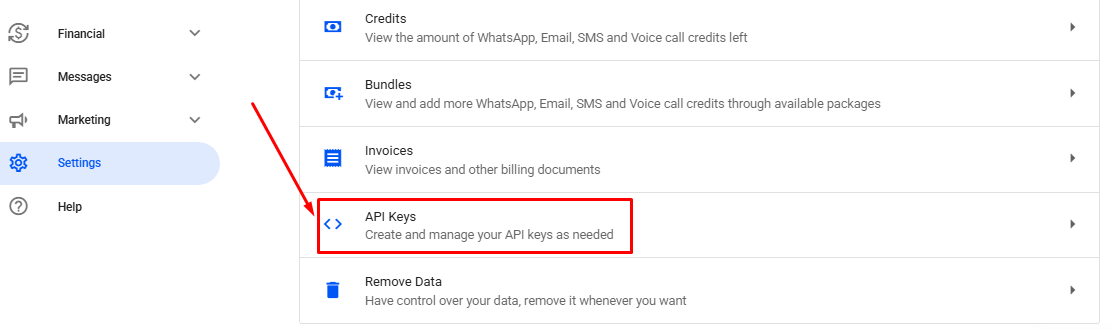
- In your Reportana account, navigate to Settings in the side menu → API Keys. Or access: Settings — API Keys.
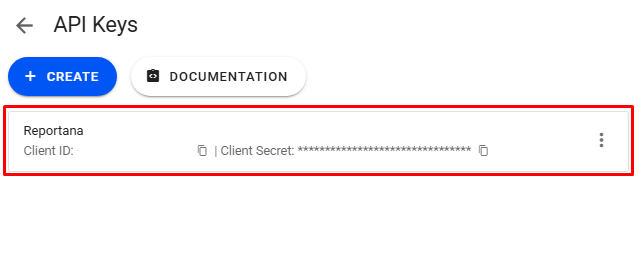
2.In this section, you can generate API keys for your account. API keys are used to authenticate and authorize access to the Reportana API. They ensure that only authorized users and applications can interact with our API.
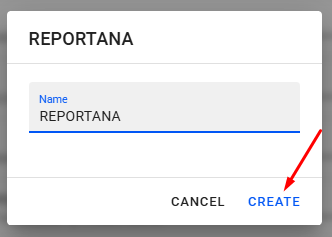
To create new API keys, click on + CREATE ➞ give a name to the desired integration ➞ click on CREATE again. This way, the keys will be generated automatically.

In the same tab, you will also have access to the API documentation. Just click on Documentation to access.
October 01, 2024
How to Access API Documentation



Related articles
How to Set Up Team Accounts
"Users" are used to allow you to add collaborators to your Reportana account. In this article, we'll show you how to send the invitation link to your employee and how how to add them to your account.

How to Change Your Subscription Plan
At Reportana, it is possible to adjust the subscription plan, guaranteeing access to the functionalities best suited to the growth of the business. In this lesson, you'll learn the step-by-step process of changing your account's subscription plan.
How to Connect WhatsApp
By connecting your company's WhatsApp to our platform, you can use our messaging chat to handle customer support, send automations, and run WhatsApp campaigns. Learn how to connect and synchronize in this tutorial.